This action extracts text from the entire PDF document or from a consecutive range of pages. It can save the same text to a RoboTask variable and a UTF-8 text file.
The action reads text already present in the PDF. It does not perform optical character recognition (OCR). Scanned pages containing only images need OCR before this action can extract their text. Text extraction does not reproduce the original page layout, and its reading order depends on the structure of the source PDF.
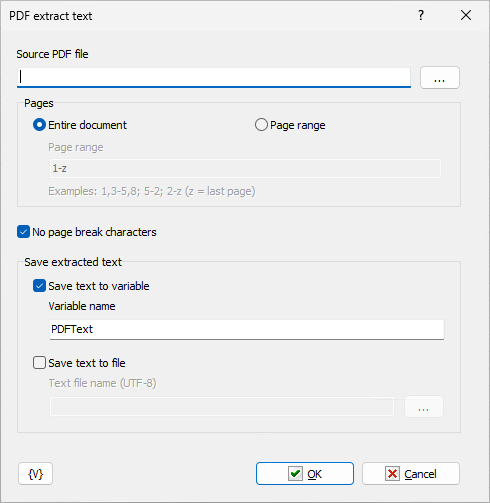
Source PDF file
Path to the PDF document to read. Required.
Entire document
Extract text from all pages. Selected by default.
Page range
Select pages using numbers, comma-separated lists, ranges, and 'z' for the last page. Required when Page range is selected. Default: '1-z'. Supports RoboTask variables.
No page break characters
Omit form-feed characters that separate PDF pages in the extracted text. Enabled by default. Clear this option to retain those characters.
Save text to variable
Store the extracted text in the specified RoboTask variable. Enabled by default.
Variable name
Name of the variable receiving the text. Required when Save text to variable is enabled. Default: 'PDFText'.
Save text to file
Write the extracted text to a file. Disabled by default.
|
Text file name (UTF-8)
Output text file path. Required when Save text to file is enabled. The file uses UTF-8 encoding and Windows line breaks.
At least one output option must be enabled. Both Save text to variable and Save text to file can be enabled together. If you turn off the last enabled output option, the editor automatically enables the other one.
This action uses separate numeric page boundaries. Comma-separated page lists and z are available in the PDF extract pages and PDF merge files actions instead.
Example: extract part of a report
Set the following parameters:
Parameter |
Value |
Source PDF file |
C:\Documents\Report.pdf |
Pages |
Page range |
Page range |
2-4,1 |
No page break characters |
Enabled |
Save text to variable |
Enabled |
Variable name |
ReportText |
Save text to file |
Enabled |
Text file name |
C:\Output\Report.txt |
The action extracts text from pages 2, 3, and 4, followed by page 1. The ReportText variable and Report.txt contain the same combined text. Later actions can use {ReportText} to search, transform, or save that text elsewhere.
 Related Topics