This action extracts images embedded in a PDF document and saves them as PNG, JPEG, or TIFF files. It can process the entire document or a consecutive range of pages and can ignore images below specified pixel dimensions.
The action extracts image objects rather than rendering complete PDF pages. A page may contain several images, and vector drawings are not exported as images. Image masks can be extracted as separate files; the action does not combine them with the corresponding image.
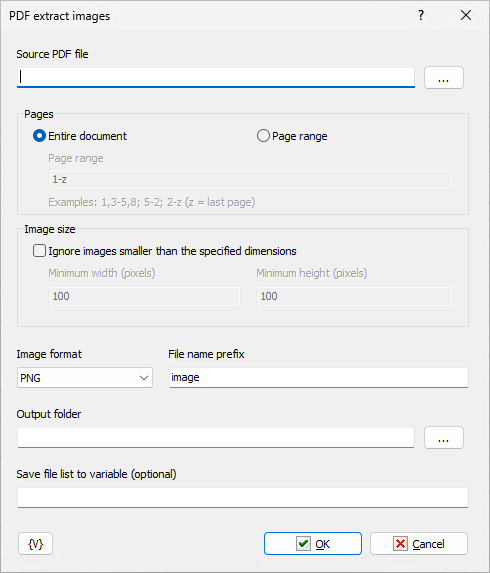
Source PDF file
Path to the PDF document containing the images. Required.
Entire document
Extract images from all pages. Selected by default.
Page range
Select pages using numbers, comma-separated lists, ranges, and z for the last page. Required when Page range is selected. Default: 1-z. Supports RoboTask variables.
Ignore images smaller than the specified dimensions
Enable filtering by minimum image width and height. Disabled by default.
Minimum width (pixels)
Minimum image width when size filtering is enabled. Must expand to a non-negative integer. 0 disables the width limit. Default: 100.
Minimum height (pixels)
Minimum image height when size filtering is enabled. Must expand to a non-negative integer. 0 disables the height limit. Default: 100.
Image format
Output format: PNG, JPEG, or TIFF. Default: PNG.
File name prefix
Prefix for generated image file names, without a folder or extension. Required. Default: image.
Output folder
Folder in which to save the extracted images. Required.
Save file list to variable (optional)
Variable receiving the full paths of the exported image files, one per line. Leave empty if the list is not needed.
The action adds image numbers to the prefix. For example, the prefix image produces names such as image-000.png and image-001.png. These numbers identify extracted images, not source pages. A %d placeholder is not needed for this action.
PNG is the default format. In JPEG mode, embedded JPEG images are preserved without re-encoding; other extracted images are converted to JPEG. During conversion, transparency is drawn over a white background. JPEG output uses the .jpg extension.
If no images match the selected pages and size limits, the action completes successfully without producing image files. Files already in the output folder are not included in the result list. Existing files with matching generated names are overwritten; unrelated files are left in place.
Example: extract larger images
Parameter |
Value |
Source PDF file |
C:\Documents\Catalog.pdf |
Pages |
Page range |
Page range |
1,3-5,z |
Ignore images smaller than the specified dimensions |
Enabled |
Minimum width |
200 |
Minimum height |
150 |
Image format |
JPEG |
File name prefix |
catalog |
Output folder |
C:\Output\CatalogImages |
Save file list to variable |
ExtractedImages |
The action extracts qualifying images from pages 1, 3, 4, 5, and the last page, in that order, and saves them under consecutive names such as catalog-000.jpg and catalog-001.jpg. Small image objects are skipped. Use the ExtractedImages variable with a subsequent loop to process the files created by this extraction.
 Related Topics